Every ride counts, whatever recorded it.
You ride with more than one device, yet Garmin almost only counts what a Garmin recorded. Your Training Status and training load then rest on part of your week. Nabe brings the rides from your Wahoo, your Apple Watch and your ride files to Garmin, and you never have to do a thing.No account with Nabe. Your rides go from your iPhone straight to your own accounts.
The ride shows up in your feed and does nothing else. No Training Effect, no load, no change to your fitness trend.
With your watch's identity switched on, your watch treats the ride as its own. Training Effect, training load and VO2 max all move, exactly as if you had worn it, under the conditions Garmin names. What they are.
You rode hard. Your watch never noticed.
Garmin counts rides from Garmin devices and from a few partner platforms such as Zwift, Rouvy or SYSTM. A ride your Wahoo bike computer recorded and that gets uploaded as a file sits in your feed and changes nothing. So you finish a long Sunday, and on Monday that ride is missing from your Training Status, as if it never happened.
The brands are competitors, and their systems do not talk to each other. Nabe sits between your devices and Garmin and closes that gap. It picks up each new ride from Wahoo, Apple Health or a file, checks that Garmin does not already have it, and passes it on so that, with your watch's identity switched on, your watch counts it as its own. Your route, heart rate, power and laps arrive exactly as you rode them.
What changes for you.
Your form reflects your week
With your watch's identity switched on and under Garmin's conditions, every transferred ride counts towards Training Status, load and VO2 max, whichever device recorded it. If a third of your rides come from a computer that is not a Garmin, Garmin no longer misses a third of your week, and your fitness curve follows what you actually did.
You stop doing the admin
No exporting, no importing, no emailing files to yourself. Open Nabe and it transfers the ride right away, and in the background when iOS allows it.
One ride stays one ride
Ride with a computer on the bars and a watch on your wrist, and you still end up with one ride. Nabe sees that Garmin already has it and leaves it alone.
Nothing to hand over
No account to create and no server of ours that holds your training. Nabe never reads or stores your Garmin password: you sign in on Garmin's own page, and at most your iPhone's keychain keeps it. Connect what you already use, and you are done.
Sign in once, where you ride
Wahoo, Apple Health or a file from anywhere. From that moment Nabe watches for anything new.
Sign in to Garmin
On Garmin's own page, inside the app. Nabe never reads or stores your password and never asks for it.
Then it runs on its own
Every device, one Garmin. The next ride goes to Garmin as soon as you open Nabe, and in the background when iOS allows it, whichever device recorded it.
No more wondering whether it made it.
Every ride tells you in plain words what became of it: "Skipped, Garmin already has this ride" instead of a red mark you have to decode.
If Garmin wants you to sign in again, that is the first thing you see, with a button. Whatever was waiting goes out right after, on its own.
reads · 4 min agoGarmin
reads · 4 min agoGarmin
writes · session expiredSign in needed
Every ride in detail, every month compared.
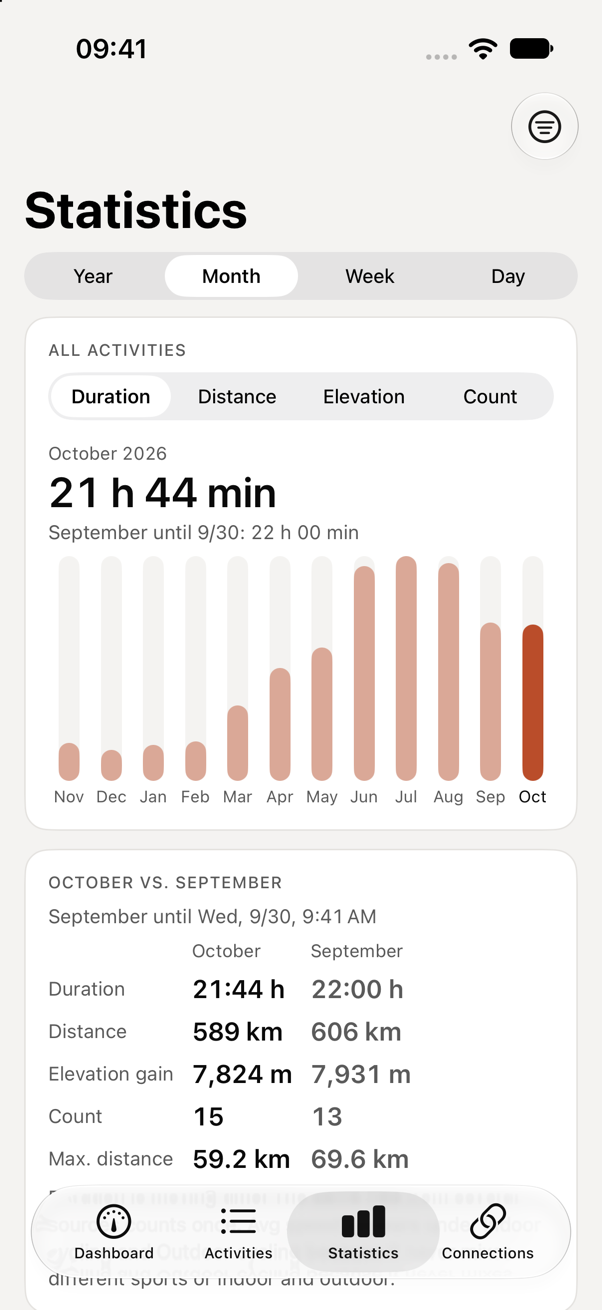
Statistics shows bars per year, month, week or day for duration, distance, elevation and count, and sets the current period against the previous one up to the same point. It is calculated on your iPhone from the history Nabe loaded.
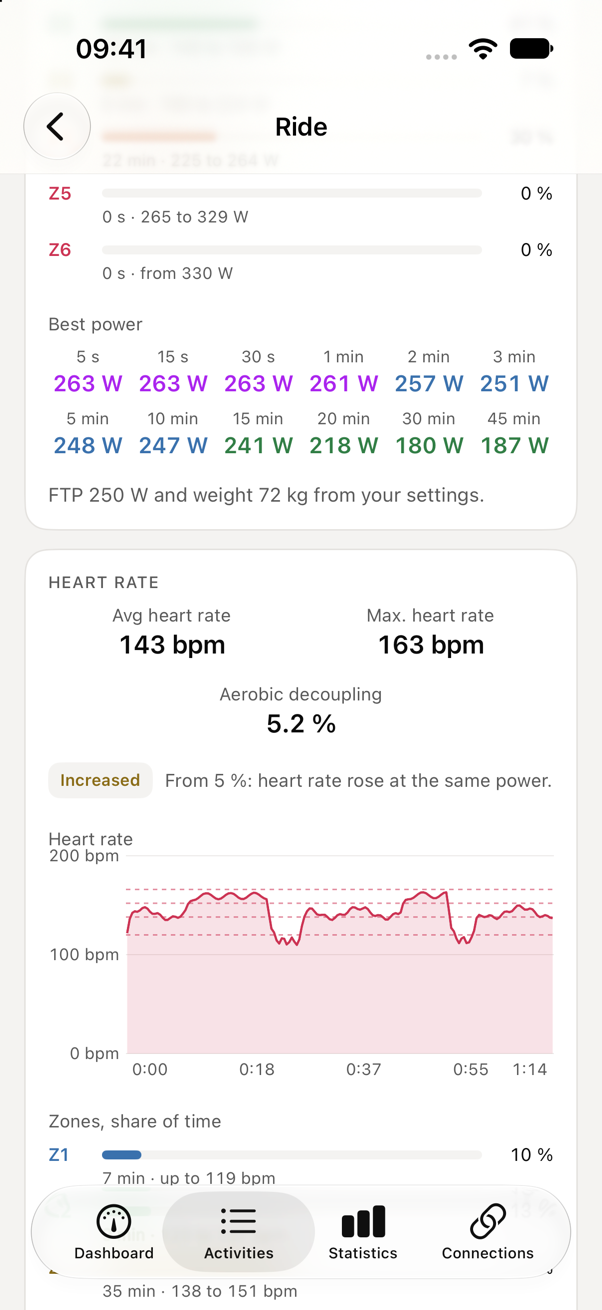
Open a ride with a recording and you get best power from 5 seconds to 45 minutes and curves for elevation, heart rate, power and speed, straight from the ride file.
Many devices, one Garmin.
Nabe joins the ecosystems you record in: the bike computers from Wahoo, the Apple Watch through Apple Health, and any FIT file. They all lead to Garmin Connect, because that is where sleep, recovery, training load and Training Status come together.
At launch
- Wahoo reads
- Apple Health reads and writes
- FIT file import and export
- Garmin Connect writes
Next up
- COROS reads
- Hammerhead reads
More will follow, each one another spoke on the same wheel.
What you should know about Garmin.
Nabe uses the session of your Garmin sign-in; it never sees or stores your password. Nabe signs in on Garmin's own login page, inside the app, and works from there. Your password stays between you and Garmin: Nabe never reads or stores it, and at most your iPhone's keychain keeps it.
Garmin changes that login now and then. When it happens, you sign in again and everything waiting catches up. Nabe tells you on the first screen, in plain words, rather than failing quietly.
We ride this ourselves. Every claim on this page about Wahoo and Garmin comes from our own rides, sent to Garmin both ways and compared, before any of it was built.
No ride goes through us. There is no Nabe account and no server of ours that receives your rides. They go from your phone to the services you picked, and nowhere else. The app asks us for a small status file that contains nothing about you. Crash reports go to Sentry only if you allow them, and they carry neither your name nor your rides.